Git for Beginners: Basics and Essential Commands
What is Git?
Git is distributed version control system that used to track the changes in the file or folder called git.
Git was created by Linus Torvalds in 2005 while building linux kernal.
Why Git is Used
keep track of file & chnages in it.
keep knowledge about who did changes
most popular version control and light weight
code collabration
Some Terminology used in git
Repository :- Repository is nothing but a folder or directory that is track by the git.
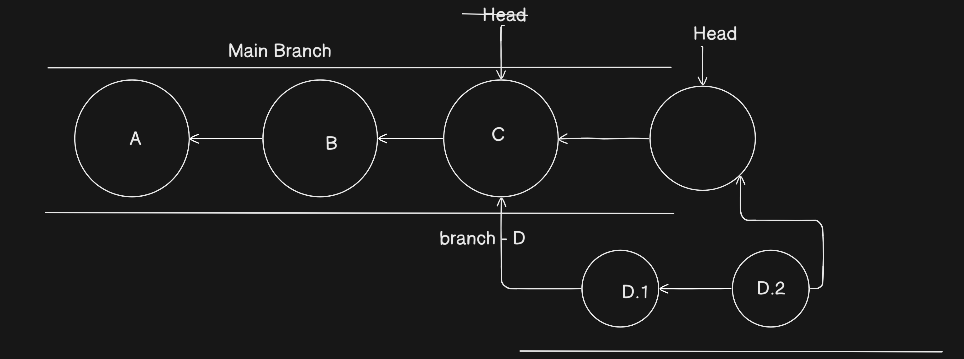
Branch :- Branch is like breaking a seperate chain or road from the main highway and furthur meet ahead.
Head :- Head is the current pointer like linkedlist head that point current node of git commit to current branch.
Push & Pull :- push means simply share the repo with remote server and pull means retrive the remote repo with local machine.
Basic Git command & steps:-
Initializing the Repository :-
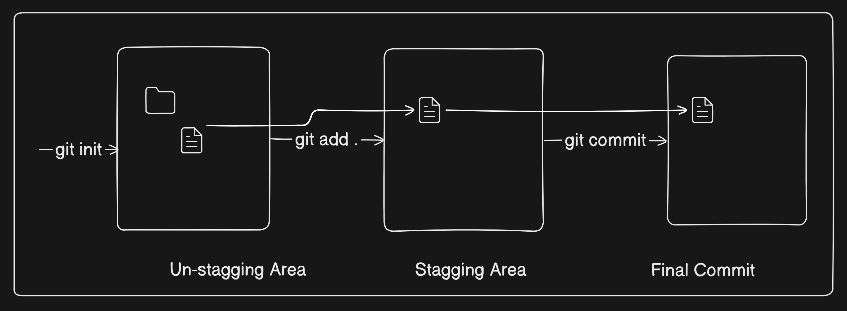
The first task is to initializing our directory so that git start look on your folder.
git init
Adding file into stagging area:-
The next step is to save the file and folder into stagging area by enter command
git add <file-name>
Snapshots (commit) the changes:-
The third steps is to save the changes or take snapshot to your changes by enter command
git commit -m "your meaning commit message"
All commit History:
To see the all commit hostory enter command
# for details history
git log

# for one line and short details
git log --oneline
Link our Local Repo to remote & push:-
To link our local repo to remote repo like github first we need to create a profile into github and create new repo by clicking on button given over there and copy the remote repo url.
# first link with remote origin
git remote add origin "enter the origin url"

# push local repo to remote repo
git push origin master/main
Clonning the remote Repository:-
Suppose we want to pull the public repository availble on remote server so first we need to copy the url and enter the command
git clone "enter the remote url"
How to create Branch in git
To create a new branch first we need to create new branch and switch we those branch for this we need to enter command
git checkout -b "new-branch-name"
Merge the Branch with main
After the building feature or completing the new branch work if we need to merge with main we need to enter these command
# go to main branch
git checkout main

# merge the complete new-branch
git merge "new-branch"

#squash all commit of new-branch
git merge --squash "new-branch"


